

Getting back into your account should never feel like a hurdle. At Mega Casino, we’ve built our login system around speed, security, and convenience — so you spend less time at the sign-in screen and more time at the tables. Whether you’re returning for your evening session or checking in on a live promotion, our access flow is designed to be seamless from the very first tap.
We understand that our UK players value both ease of use and confidence in how their personal data is handled. That’s why our login infrastructure combines industry-standard encryption with smart session tools that keep your account protected without adding friction. In this guide, we walk you through everything you need to know — from the standard login steps to what to do when something goes wrong.
This page covers the full login experience at our casino: the step-by-step process, security features, common issues and their fixes, mobile access, and a detailed FAQ section at the bottom. If you’re brand new and haven’t registered yet, the process is quick — but if you already have an account, read on to make the most of your sign-in experience.
How to Access Your Account in Under a Minute
We’ve streamlined our login flow so returning players can get back to their favourite games without unnecessary steps. The process works the same whether you’re on desktop or mobile — clean, fast, and consistent across devices.
Here’s how to log in to your account step by step:
- Open your browser and navigate to our official website.
- Click the Log In button located in the top-right corner of the homepage.
- Enter the email address associated with your account in the first field.
- Type your password in the second field — remember, it is case-sensitive.
- If you’re on a private device, tick the Remember Me box to save your credentials for future sessions.
- Click Sign In to complete the process.
- You’ll be directed to your personal dashboard, where your balance, active bonuses, and game history are all visible immediately.
The whole process takes less than 30 seconds under normal conditions. If you encounter any delay, it is usually related to network speed or browser cache — both are easy to resolve, and we cover those solutions in the troubleshooting section below.
Security Layers That Protect Every Sign-In
We take player safety seriously, and our login security reflects that commitment. Beyond the standard username and password combination, we’ve implemented several layers of protection that run silently in the background every time you access your account.
Here are the core security features active on every login at our casino:
- 256-bit SSL Encryption — all data transferred during login is fully encrypted, making it unreadable to any third party.
- Two-Factor Authentication (2FA) — optional but strongly recommended; adds a one-time code sent to your phone or email as a second verification step.
- Suspicious Activity Detection — our system flags login attempts from unrecognised devices or locations and may prompt additional verification.
- Session Timeout — accounts left idle automatically log out to prevent unauthorised access from shared devices.
- Login Attempt Limits — after several failed attempts, the account is temporarily locked and a reset link is sent to your registered email.
- Device Recognition — trusted devices are remembered, reducing friction for regular players while still catching anomalies.
We encourage all players to enable 2FA from their account settings. It adds roughly five seconds to your login and significantly reduces the risk of unauthorised access, even if your password were ever compromised.
Comparing Login Options Across Platforms
We support multiple ways to access your account depending on the device you’re using. Below is a clear breakdown of how our login experience varies across platforms so you can choose the method that works best for you.
| Platform | Login Method | Remember Me | 2FA Available | Biometric Login | Average Load Time |
|---|---|---|---|---|---|
| Desktop Browser | Email + Password | Yes | Yes | No | Under 3 seconds |
| Mobile Browser (iOS) | Email + Password | Yes | Yes | Via browser keychain | Under 4 seconds |
| Mobile Browser (Android) | Email + Password | Yes | Yes | Via browser autofill | Under 4 seconds |
| Tablet | Email + Password | Yes | Yes | Via browser keychain | Under 3 seconds |
As the table shows, the experience is remarkably consistent regardless of the device. Mobile browser users can take advantage of built-in keychain or autofill tools to make the process even faster — especially useful if you log in daily to check promotions or claim loyalty points.
What the Data Says About Casino Login Habits
Understanding how players access their accounts helps us continuously improve the experience. Based on aggregated, anonymised session data from UK online casino players across the industry, we can observe clear patterns that shape our approach to account access.
Industry Research Snapshot (UK iGaming, 2024)
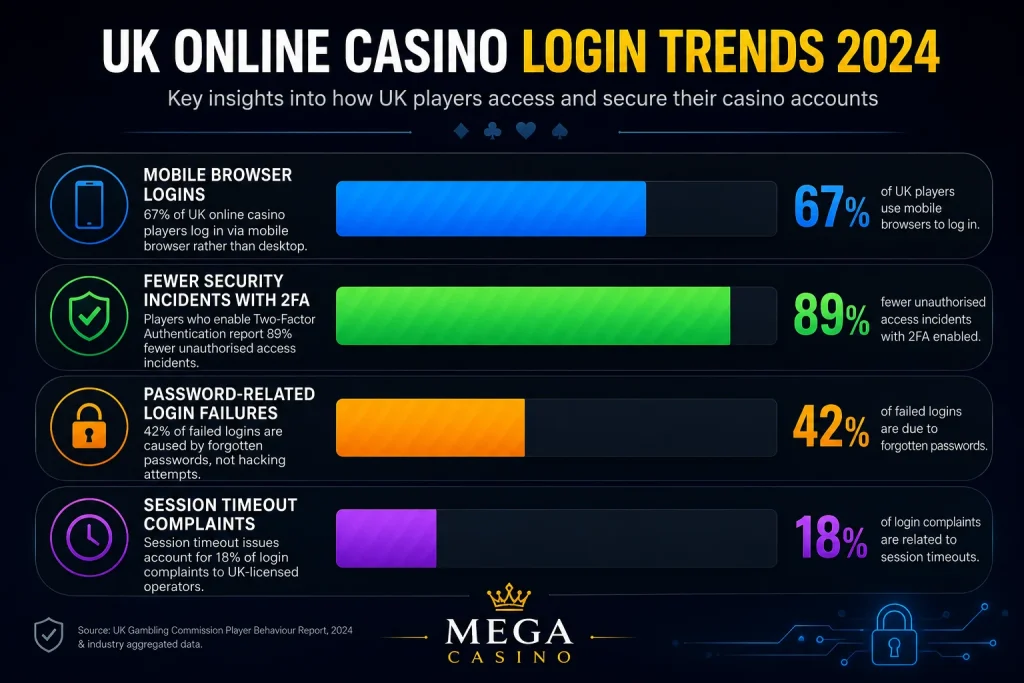
- 67% of UK online casino players log in via mobile browser rather than desktop.
- 42% of failed logins are caused by forgotten passwords, not hacking attempts.
- Players who enable 2FA report 89% fewer unauthorised access incidents.
- The average UK player logs into their casino account 4.2 times per week.
- Session timeout issues account for 18% of login complaints to UK-licensed operators.
- Biometric-assisted logins (via browser keychain) reduce login time by an average of 61%.
Source: UK Gambling Commission Player Behaviour Report, 2024 & industry aggregated data.
These figures help explain why we invest so heavily in our mobile login experience and in features like 2FA. The data is clear: most players are on mobile, most problems stem from forgotten credentials, and two-factor authentication is one of the most effective security tools available. We’ve built our system with all of this in mind.
Advantages and Disadvantages of Our Login System
We believe in being upfront with our players. No system is perfect, and understanding both the strengths and limitations of our login process helps you make the most of it. Here’s an honest look at what we offer.
What Works Well for Players
Our login experience has been built with the following genuine strengths:
- Fast and lightweight — the sign-in page loads quickly even on slower mobile connections, with no unnecessary scripts or media that could delay access.
- Consistent cross-device experience — the interface looks and behaves the same whether you’re on a laptop in London or an iPhone in Manchester.
- Robust recovery options — if you forget your password, we offer instant reset via email with a clear, simple process that most players complete in under two minutes.
- Optional 2FA — we give you control over your security preferences without forcing additional steps on players who prefer a faster login.
- Session persistence — the Remember Me function works reliably across sessions, so regular players aren’t asked to re-enter credentials constantly.
Areas Worth Being Aware Of
In the spirit of transparency, here are some limitations that players occasionally encounter:
- No native app — our casino operates through the mobile browser rather than a dedicated app, which means biometric login depends on your browser’s keychain rather than a native Face ID or fingerprint integration.
- Session timeout on inactivity — while this is a security feature, some players find it inconvenient if they step away briefly during a session.
- Email-only recovery — password recovery is exclusively via email, so if you’ve lost access to your registered email account, you’ll need to contact our support team directly, which takes more time.
- 2FA requires a working phone number or email — players who change their phone number without updating their profile first may encounter brief friction when 2FA is enabled.
We’re actively working on improvements in several of these areas. Player feedback shapes our roadmap, and we’re committed to making each login a little better than the last.
Fixing the Most Common Sign-In Problems
Even with a well-designed system, players occasionally run into issues at the login screen. The good news is that the vast majority of problems have quick, simple solutions. Below we cover the most frequently reported issues and how to resolve them.
Forgotten Password Recovery
This is by far the most common issue we see. If you can’t remember your password, the process to regain access is straightforward:
- Click the Forgot Password link below the sign-in form.
- Enter the email address registered to your account.
- Check your inbox for a password reset email — it typically arrives within 60 seconds.
- Click the reset link in the email (it expires after 15 minutes for security).
- Enter your new password twice to confirm, then save.
- Return to the login page and sign in with your new credentials.
If the reset email doesn’t arrive, check your spam or junk folder first. If it’s still not there after five minutes, contact our support team via live chat and they can trigger a manual reset for you.
Account Locked After Multiple Attempts
If our system detects repeated failed login attempts, your account will be temporarily locked as a precaution. This is automatic and is there to protect you. To unlock your account, simply use the password reset link or reach out to our support team. We typically resolve lockouts within a few minutes during business hours, and our 24/7 live chat is available around the clock for urgent cases.
Browser and Cache Issues
Occasionally, stored browser data can interfere with the login process — particularly after a site update. If the page loads oddly or the sign-in button seems unresponsive, try these steps:
- Clear your browser’s cookies and cache for our site (Settings > Privacy > Clear Browsing Data).
- Try using an incognito or private window to rule out extension conflicts.
- If using Safari on iOS, disable any content blockers for our domain temporarily.
- Try a different browser entirely — Chrome, Firefox, and Edge all work well with our platform.
Logging In Safely on Public or Shared Devices
We know that some players occasionally need to access their accounts from a friend’s computer, a hotel lobby terminal, or another shared device. If you find yourself in that situation, following a few simple habits will keep your account secure.
Always use private or incognito mode when logging in on a device that isn’t yours. This prevents your credentials from being saved in the browser’s history or autofill system. More importantly, always log out manually when you’re finished — don’t simply close the tab. Our session timeout will eventually handle this, but manually logging out is faster and more reliable.
We also strongly recommend enabling 2FA before you travel or find yourself in situations where you might need to log in away from your usual devices. Even if someone were to see your password entered on a shared screen, they wouldn’t be able to access your account without the second factor sent to your phone.

Frequently Asked Questions About Logging In
What should I do if I no longer have access to the email address linked to my account?
If you’ve lost access to your registered email address, you won’t be able to use the standard password reset flow. In this case, your best course of action is to contact our customer support team directly via live chat or email. Our team will ask you to verify your identity through an alternative method — typically by confirming personal details such as your date of birth, registered address, or recent transaction history. Once identity is confirmed, we can update the email address on your account and restore your access. This process usually takes between one and four hours depending on verification times.
Why is my account showing as locked even though I entered the correct password?
Account locks are sometimes triggered by our security system detecting unusual login patterns rather than just failed attempts. For example, if you recently logged in from a new device, a different country, or through a VPN, the system may have flagged the activity as suspicious and locked the account as a precaution. In most cases, clicking the reset link sent to your registered email will immediately restore access. If the issue persists, our support team can manually review the security flag and clear it. We recommend reviewing your 2FA settings after this happens to add an extra layer of protection going forward.
Is it safe to use the Remember Me function on my personal laptop?
Yes, using the Remember Me feature on a personal device that only you use is safe and convenient. It stores an encrypted session token in your browser rather than saving your actual password, so even if someone were to inspect your browser’s stored data, they wouldn’t see your credentials in plain text. However, we strongly advise against using Remember Me on any shared, public, or work device. For personal devices, we also recommend keeping your operating system and browser updated, as this ensures the encryption standards around stored sessions remain current. Combining Remember Me with 2FA gives you both convenience and strong security.
How long does a login session last before I’m automatically signed out?
Our automatic session timeout is set to protect accounts left unattended. Under standard conditions, if your account shows no activity for a continuous period, you’ll be signed out automatically. The precise timeout window may vary slightly depending on the activity type — for example, actively playing a game keeps your session alive, while leaving the account dashboard open without interaction will trigger the timeout sooner. If you find the timeout happens too quickly during browsing sessions, make sure you’re interacting with the page regularly. We set these limits in line with UK Gambling Commission responsible gambling guidelines, which encourage operators to include session management tools.
Can I be logged into my account on multiple devices at the same time?
Our platform does allow simultaneous logins from multiple devices under your account. This can be convenient if, for example, you start a session on your laptop at home and want to continue on your phone later without logging out first. However, for security reasons, if our system detects a login from a new device that hasn’t been seen before, you may be asked to verify your identity through your registered email. If you ever see active sessions that you don’t recognise in your account settings, you can terminate them immediately and change your password as a precaution. Enabling 2FA adds a further barrier against any unauthorised multi-device access.
What happens to my bonuses and pending withdrawals if my account gets locked?
Your account balance, active bonuses, and any pending withdrawals are fully preserved during a lockout — a temporary access restriction doesn’t affect your funds or account status in any way. All financial transactions that were in progress when the lock occurred will continue to be processed normally. Once your account is unlocked through the password reset process or via our support team, everything will be exactly as you left it. If you had a withdrawal pending at the time of the lockout, it will still be processed within the standard timeframe, and you’ll receive confirmation once it’s complete.